 Mochi Labs
The Repost Penalty: Why Recycling Your TikTok Onto Instagram Is Quietly Killing Your Reach
Instagram now caps reach on watermarked TikTok reposts in 2026. Here's how working creators decide what to recut natively, and what to just leave alone.
A clip goes up on TikTok at noon. By twelve-oh-five it's sitting on Instagram too, same watermark, same crop, same caption. For years that was just efficient. Now it's quietly the reason that second post goes nowhere.
If you've noticed your Reels numbers sagging on anything that started life somewhere else, you're not imagining it, and you're not alone in wondering why. Here's what changed, and a real way to decide what's worth re-cutting and what's worth leaving right where it is.
Why Instagram Penalizes Reposted TikTok Content in 2026
The official definition
Instagram has a written definition of "original" content, and it's stricter than most creators assume. Per Meta's own help center page on original content, adding a watermark, a border, or a caption on top of a clip does not count as material editing. That means the version of your TikTok you dragged a logo onto and reposted unchanged reads to Instagram's systems as the same video it was before, not a new one.
This isn't a new idea, just a sharper edge
Instagram has been signaling this for a while. Back in 2021 the platform said outright that it would stop recommending Reels carrying a visible TikTok logo, a policy covered in detail by The Next Web, including the pushback from creators who felt punished for simply cross-posting their own work. The complaint then is the complaint now: the rule treats a creator's own footage as contraband because of where it was first uploaded, not because of anything wrong with the footage itself.
It isn't just TikTok, and it isn't just video
The same logic has been spreading for years. YouTube Shorts started stamping its own watermark onto downloaded clips specifically to discourage cross-platform reposting, which means a clip that bounces from Shorts to Reels now often carries two logos instead of one. And the penalty for sameness has quietly moved past video. Instagram's recommendation algorithm now also suppresses photo and carousel posts it judges unoriginal, which covers the practice of reposting a gallery that already circulated somewhere else, watermark or not.
Put those three together and the pattern is clear: the old advice to post everything everywhere, as fast as possible, is working against you on the platform that used to reward it most. Repurposing content across platforms isn't dead. It just stopped meaning copy and paste.
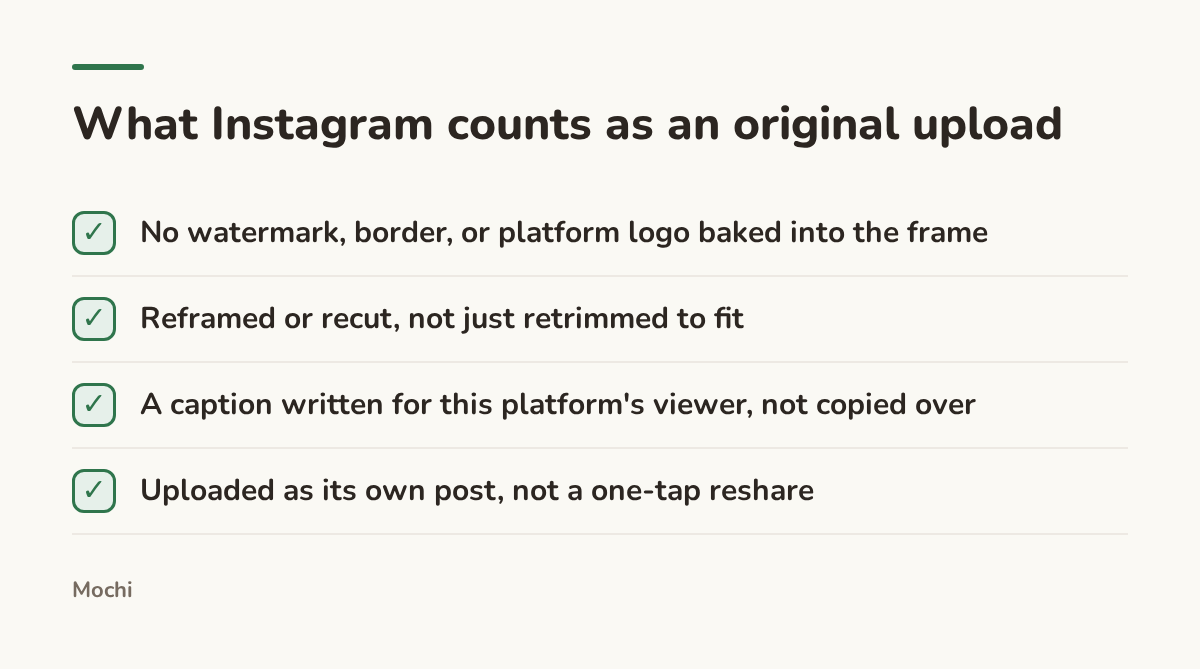
A caption or a crop isn't enough. Instagram wants a different video, not a dressed-up copy.
Step 1: Audit What You're Actually Posting on Autopilot
Before you decide what to fix, look honestly at what you're doing right now. Open your last two weeks of Reels and ask, clip by clip: did this exist somewhere else first, and does it still carry any trace of that, a logo in the corner, a username watermark, burned-in captions in a font that isn't yours?
Here's what that fifteen-minute audit usually turns up: a handful of reaction clips with a watermark baked into the corner, a trending-sound clip reposted the same afternoon it went up elsewhere, and maybe a photo carousel assembled from images that already circulated somewhere else first. None of that was wrong to do a year ago. It's just worth seeing clearly before you decide what changes.
Most working creators find the answer is yes, more than they thought. That's not a judgment. Reposting as-is used to be the correct move. The audit is just the first honest step toward a different one.
Step 2: Decide What Earns a Native Recut
Not every clip is worth the extra work of rebuilding it for a second platform. The question that actually sorts them is simple: does this piece have a shelf life past the moment it was trendy, and is its hook doing something only context can explain?
Take a wedding photographer who posts a first-look reaction on TikTok with trending audio and a hook built to look like a diary entry. That clip is worth rebuilding for Instagram, because a first-look reaction holds up months later, long after the trending sound has moved on.
Before: POV: the first look nobody saw coming 😭 (TikTok watermark visible in the corner, same video reposted untouched to Reels) After: This first look took three tries to get right. Here's the one we kept. (watermark cropped out, new on-screen text, caption rewritten for a viewer who has never seen the TikTok version)
The rewrite works because Instagram's systems read the clean frame as a new upload instead of a rerun, and the new hook gives a stranger who never saw the original a reason to keep watching instead of a reason to recognize it.
Now take the opposite case: a musician posting a twelve-second rehearsal clip built entirely around a trending TikTok sound. That clip's whole value is the trend it's riding, and the trend doesn't travel. Recutting it for Instagram buys almost nothing, because strip the sound and the context and there's no clip left worth watching. The better move is to leave that one on TikTok and spend the recut effort on the forty-second performance clip from the same session, the one with its own visual hook that doesn't depend on a sound anyone else recognizes.
That's the actual rule hiding under the "repost penalty" headlines: recut the clips whose value survives the move, and don't bother with the ones whose value was the platform they were born on.
Step 3: Build a Lightweight Native-Recut Pass
Once you know a clip is worth recutting, the pass itself doesn't need to be a production. It needs four things, done in order, every time.
Start from the raw export, not the TikTok download. A clip pulled back off TikTok already carries a watermark baked permanently into the pixels, and no crop fully removes it without cutting into the frame. If you still have the original footage on your phone or in your editing app, start there.
Reframe for the platform you're posting to, not the one you shot for. TikTok's interface puts captions and usernames at different edges than Instagram's does, so a clip cropped to dodge TikTok's UI often leaves dead space or a cut-off subject on Reels.
Rewrite the hook for someone meeting the clip cold. This is the part creators skip most often, and it's the part that matters most.
Before: wait for the drop 🎧 (hand on a turntable, TikTok UI elements still visible at the frame's edges, 9:16 crop carried over unchanged) After: This transition took four months to land clean. (re-exported from the raw source at full resolution, new on-screen text, caption adds the context a cold viewer needs)
It works for the same reason the photographer's rewrite does: it treats the Reels viewer as someone meeting the moment for the first time, which is exactly the distinction the platform is now built to reward.
Last, write the caption fresh. A caption copied over from TikTok is written for people who already follow you there. An Instagram caption has to earn the same attention from someone who's never seen any of it.
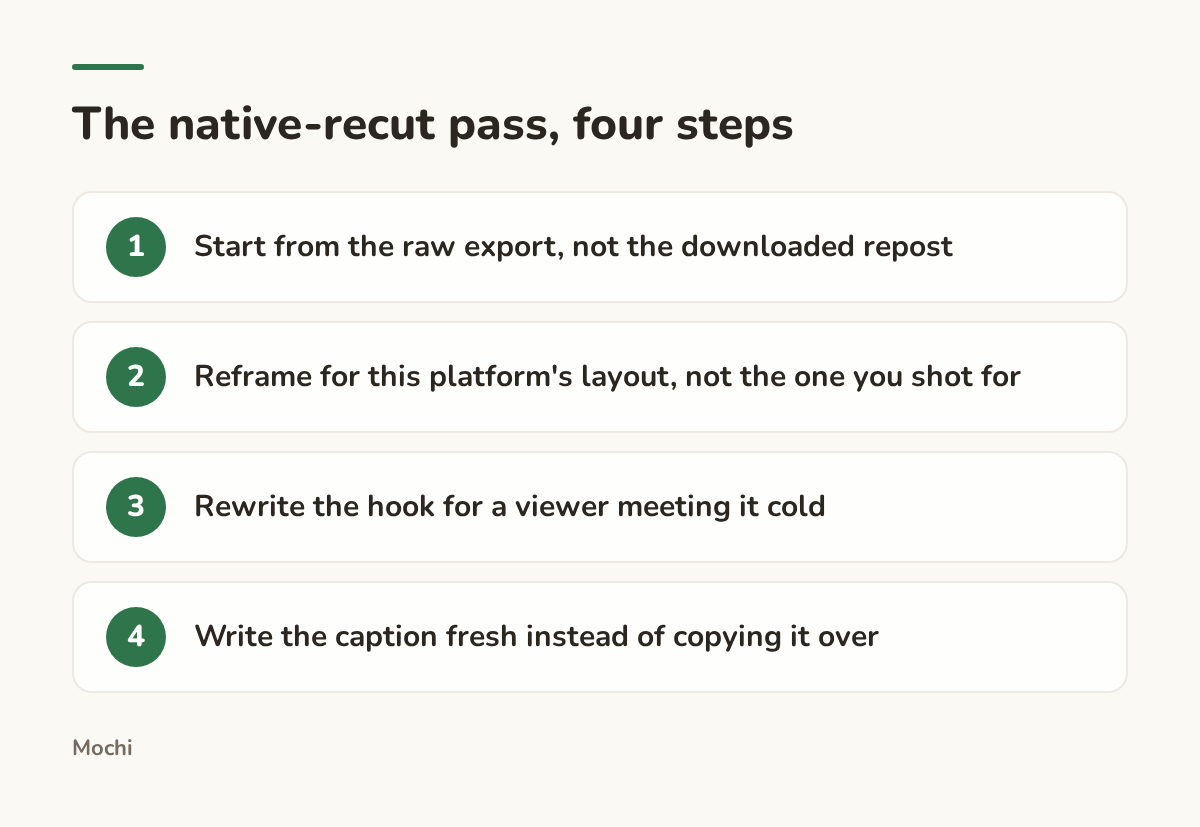
None of these four steps takes long. Skipping any one of them is what makes the recut pointless.
Step 4: Know When to Leave It on One Platform
The flip side of all this matters just as much: not recutting something is a legitimate choice, not a missed opportunity. A clip that leans on a sound, a meme format, or an in-joke that only reads inside TikTok's culture will not perform better for the ten minutes you spend giving it a new hook on Instagram. It will just be a slightly more polished clip that still doesn't land, because the thing that made it work in the first place didn't travel with it.
Take a videographer who shoots behind-the-scenes clips on set. A thirty-second blooper reel built around an inside joke with the crew is TikTok's native language: quick, low-stakes, and funny mostly to people who already follow along. Recutting it for Instagram with a new hook won't make the joke land any harder for a cold audience, because the joke was never the point for them. Save the recut effort for the clip that actually shows craft instead, the slow pull-back revealing a full lighting rig, because that one carries its own visual hook regardless of who's watching or why.
The same goes for a photo carousel built entirely around a caption style or a trend that's specific to one platform's audience. If the format itself is the platform's native language, respect that and let it stay there.
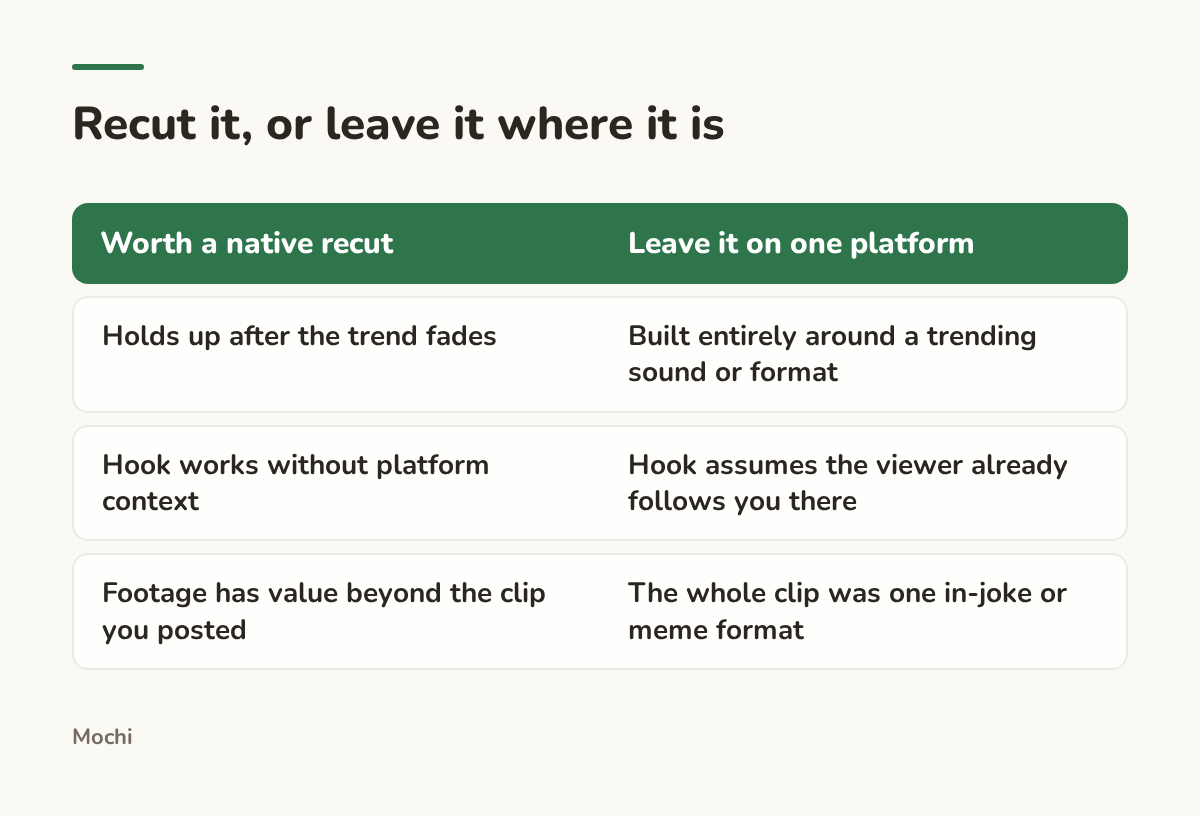
The deciding question isn't "can I repost this." It's "does this still work once the context that made it land is gone."
This is a judgment call creators now have to make every week instead of skipping entirely, and no tool makes it for you. What a tool like Mochi can do is hold the two decisions side by side on one calendar, so the clip you're recutting natively and the clip you're deliberately leaving on one platform both stay visible instead of living only in your head or a messy camera roll.
What This Changes About Your Posting Rhythm
The old playbook said post everywhere, as fast as possible, in whatever form the clip already existed. The new one asks a slower question first: does this piece earn a second platform, or does it just owe one a courtesy visit. Audit what you're already reposting on autopilot, split it into what's worth rebuilding and what isn't, and give the keepers an actual native pass instead of a watermark and a prayer. Do that consistently and the platforms stop competing with each other for your attention and start each pulling their own weight.
Which of your last ten posts would survive that question, and which were just a watermark away from costing you the reach you were counting on?
Part of a series
The Creator's Playbook
Evergreen craft for working creators: brand, content planning, and publishing, written by the team that builds Mochi.