 Mochi Labs
Which Analytics Matter for an Independent Creator (and the Dozen You Can Ignore)
Most dashboards are built for ad teams, not makers. Here's which analytics actually matter for an independent creator, and a dozen you can stop checking.
Open your analytics tab right now. Count how many numbers are staring back at you. Now ask how many of them actually changed what you filmed, wrote, or posted this week.
For most working creators, the honest answer is one, maybe none. The dashboard you're looking at was built for an ad buyer who has to defend a budget to a client on Monday morning, not for someone deciding whether to post the behind-the-scenes clip or the finished piece tomorrow. The tools kept the ad team's instrument panel and just resized it for a phone screen.
We watch creators treat every number on that screen as equally urgent, and it quietly costs them the thing they came to do in the first place: make the next piece of work. So we went looking for the smallest list of numbers that could reasonably change a decision. The list turned out to be short. Three numbers. Everything else on that dashboard is fine to glance at out of curiosity, but it shouldn't move your plan.
Why the dashboard is lying to you
Most of what a platform shows you first is what researchers call a vanity metric: a number that only ever goes up, feels good to watch climb, and tells you nothing about what to do differently. Followers, impressions, total views. They describe scale. They don't describe cause and effect.
Nielsen Norman Group's research on vanity metrics makes the distinction plainly: a real metric is a rate or a ratio you can act on, not a running total that only ever climbs. Eric Ries put it even more bluntly years earlier: if a number can't show you a clear cause and effect, it isn't worth your attention, no matter how satisfying it is to watch it grow.
That's the test we use now. Not "does this number look good in a screenshot," but "if this number moved, would I know what to do next." Most of what's on your dashboard fails that test immediately.
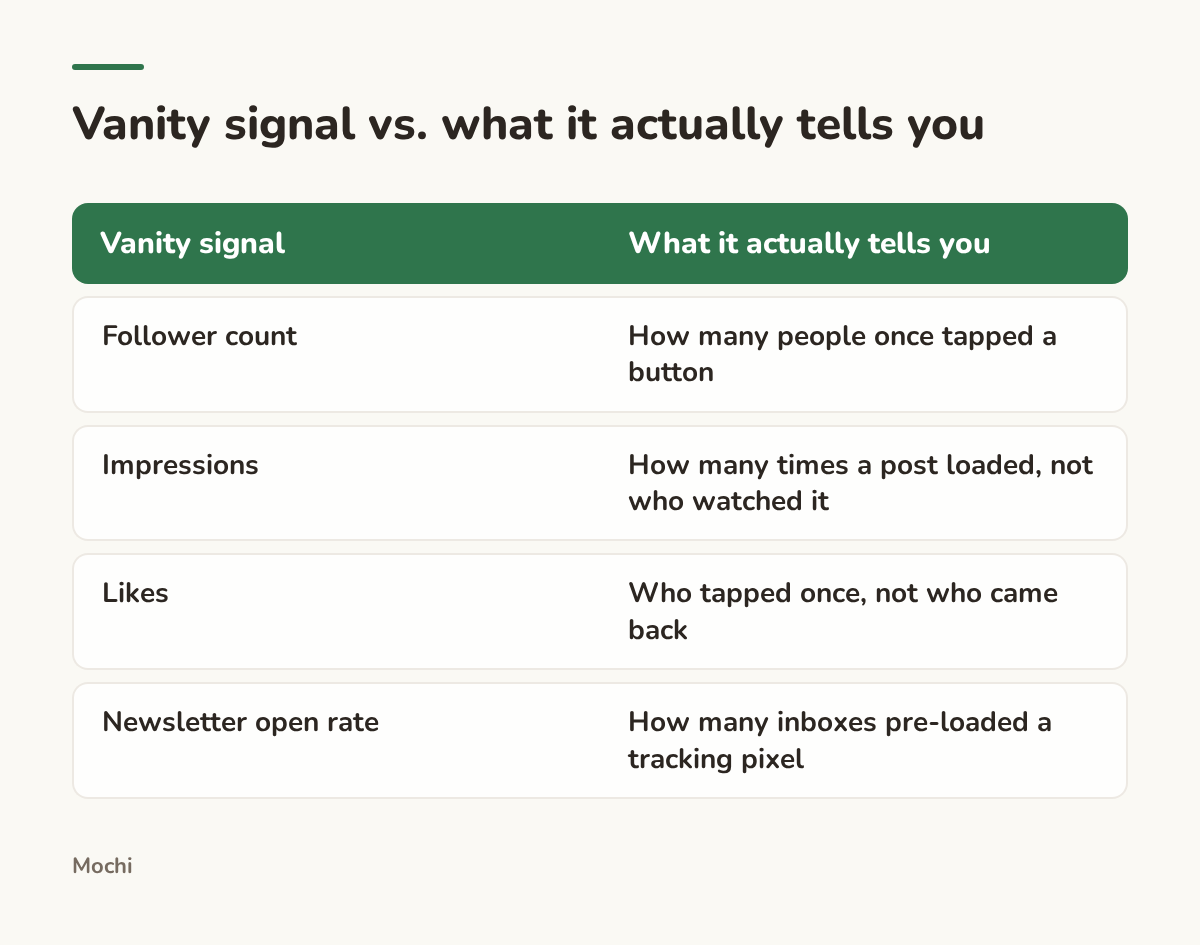
A number that only ever climbs rarely tells you what to make next.
The three numbers worth checking
Here's the short list. Each one passes the cause-and-effect test: if it moves, you know something real changed, and you have a rough idea what to do about it.
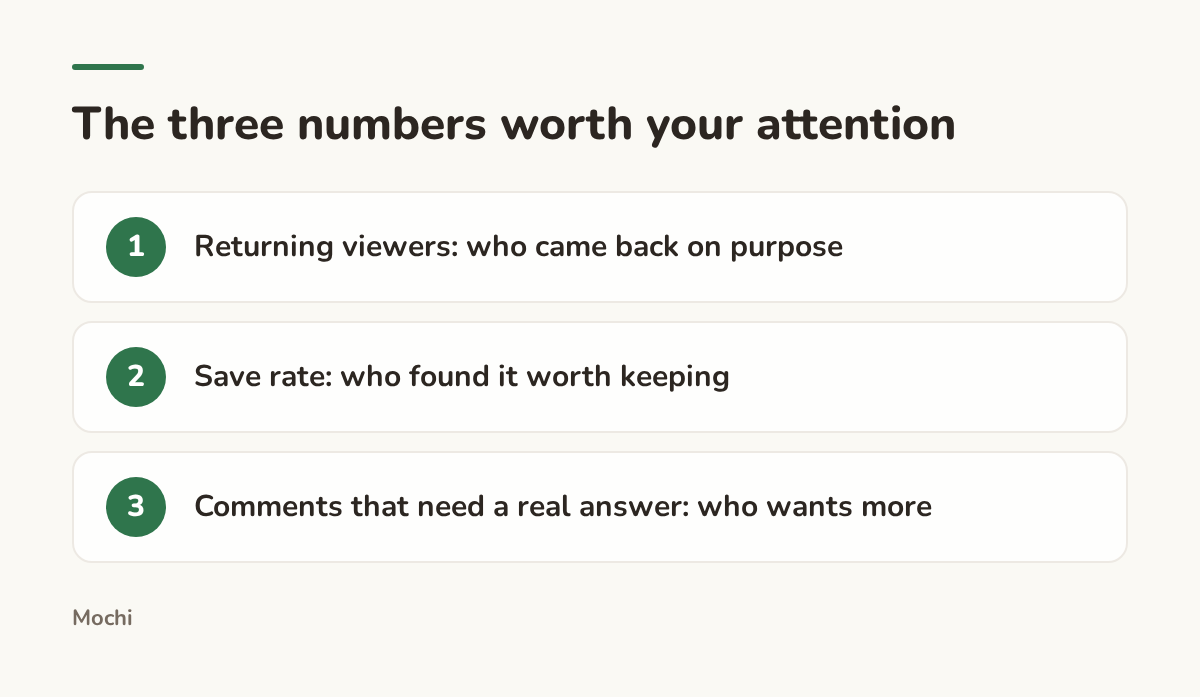
Everything else on the dashboard is optional reading.
Number one: how many people come back
A new viewer and a returning viewer are not the same event, even though most dashboards lump them into one "views" number. YouTube's own guidance to creators separates the two on purpose, because a channel that only ever reaches new people hasn't built anything yet. It's reached people. Reach and audience aren't the same thing.
Picture a landscape painter posting process videos on YouTube Shorts. Her total views climb every month, driven by the platform pushing her work to strangers who've never seen her before. That number alone would tell her to keep doing exactly what she's doing. But when she checks what share of her viewers are returning rather than new, the number barely moves. She's reaching a lot of strangers once and almost nobody twice, a different problem than "make more videos," and one only the returning-viewer number would have surfaced.
The takeaway: a channel that's actually building something shows a rising share of returning viewers over time, not just a rising view count. If yours isn't moving, the fix usually isn't more volume. It's giving people a reason to come back on purpose: a series, a running bit, a format they recognize.
Number two: who found it worth keeping
A like costs a viewer almost nothing: a reflex tap while scrolling past. A save costs a decision. Someone stopped, decided the post was useful or beautiful enough to want again, and put it somewhere they'd find it later. That's a different signal than a like, and it's the one most creators never separate from the pile of likes on their dashboard.
Take a ceramicist posting process clips of trimming a bowl on the wheel. A finished-piece photo usually pulls more likes, because it's an easy, instant thing to approve of. But her process clips pull a much higher save rate relative to how many people saw them, because people learning the craft or planning their own studio setup want to find that clip again. Reading likes alone, she'd keep making finished-piece photos. The save rate tells her the process clips are doing something the finished photos aren't: teaching someone something they intend to use.
The takeaway: don't just ask what got the most engagement. Ask what got saved relative to how far it traveled. That ratio, not the raw count, is what tells you a piece earned real intent instead of a passing glance.
Number three: the comments that need a real answer
Not every comment is a signal. A fire emoji or "love this" is nice to receive and tells you nothing to do differently. The comments worth tracking are the ones that are actually questions: the same question, showing up again and again, under different posts.
Picture a wedding photographer who keeps getting some version of "do you travel for destination weddings" under her reels, regardless of what the reel is actually about. That's not noise. That's an audience telling her, repeatedly and for free, exactly what information is missing from her content and her bio. One version of that comment is a one-off. Six versions over a month is a brief for her next post, maybe even for her pinned one.
The takeaway: count repeated questions, not total comments. A comment section full of fire emojis and zero repeated questions is pleasant and tells you nothing. A comment section with the same question five times is one of the most useful, most ignored numbers on the entire dashboard.
The dozen you can safely ignore
Once you're checking those three, almost everything else on the dashboard can go back to being background noise. That includes a few numbers that feel too important to skip, so it's worth saying plainly why each one is safe to stop watching.
The one Apple quietly broke for you
If you send a newsletter alongside your posts, you've probably watched your open rate and treated a good week as proof the subject line worked. Worth knowing: a large share of inboxes now pre-load every tracking pixel in an email the moment it arrives, before a person has opened anything. Apple explains this directly as part of Mail Privacy Protection: it hides whether and when mail was opened by loading remote content automatically. A meaningful chunk of your "opens" happened whether or not a human ever looked at the email. The number still moves. It just doesn't mean what it used to.
If you run a website or shop alongside your socials, the same logic applies to raw traffic. A pageview tells you a page loaded. Google's own definition of an engaged session is closer to what you actually want: did someone stay, click something, or come back, rather than just land and bounce. Same lesson as everywhere else on this list: the raw count is rarely the useful number. The rate behind it usually is.
What changes when you only track three numbers
None of this is about caring less. It's about caring about the right things, because a creator checking twenty numbers a week has less attention left for the work than one checking three. Kevin Kelly's 1,000 True Fans essay makes the underlying point better than any dashboard could: a smaller group of people who actually come back and actually buy is worth more than a much larger group who merely saw you once. Returning viewers, saves, and repeated questions are just that idea translated into numbers you can check in five minutes on a Monday.

This is part of why we built Mochi's analytics screen as one scoreboard instead of a dashboard of twenty charts. Fewer numbers, chosen on purpose, beat a wall of data nobody has time to read.
So the next time you open that tab, skip straight to the three. What did the last one tell you to make differently?
Part of a series
The Creator's Playbook
Evergreen craft for working creators: brand, content planning, and publishing, written by the team that builds Mochi.